Report
Track Your Creative Operations KPIs
If it’s in RoboHead, you can report it. Use data to identify areas for improvement, introduce process changes, and track the efficiencies gained over time.
THE CHALLENGE
Visibility is Fragmented
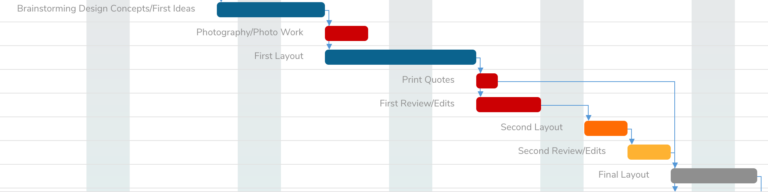
Leadership asks “how many projects are in flight?” and you have to check four different tools. You don’t know if your team is underwater or overbooked. You can’t see which projects are at risk until they’re already late. And when a stakeholder asks “when will this be done?” you’re guessing based on incomplete information.
WITHOUT ROBOHEAD
Sifting Through Reports
WITH ROBOHEAD
100% VISIBILITY
Know exactly where every project stands right now.
Reporting gives you a single dashboard where you can see all projects, their status, who’s working on them, and when they’re due. No hunting through Slack threads. No asking team members for manual updates.
Leadership gets visibility without slowing down creative work. They see the real state of projects without needing spreadsheets, status meetings, or guesswork.
- Real-time project status and timelines
- Current stage and next steps for every project
- Drill-down capability to task and team level
Surface Bottlenecks Quickly
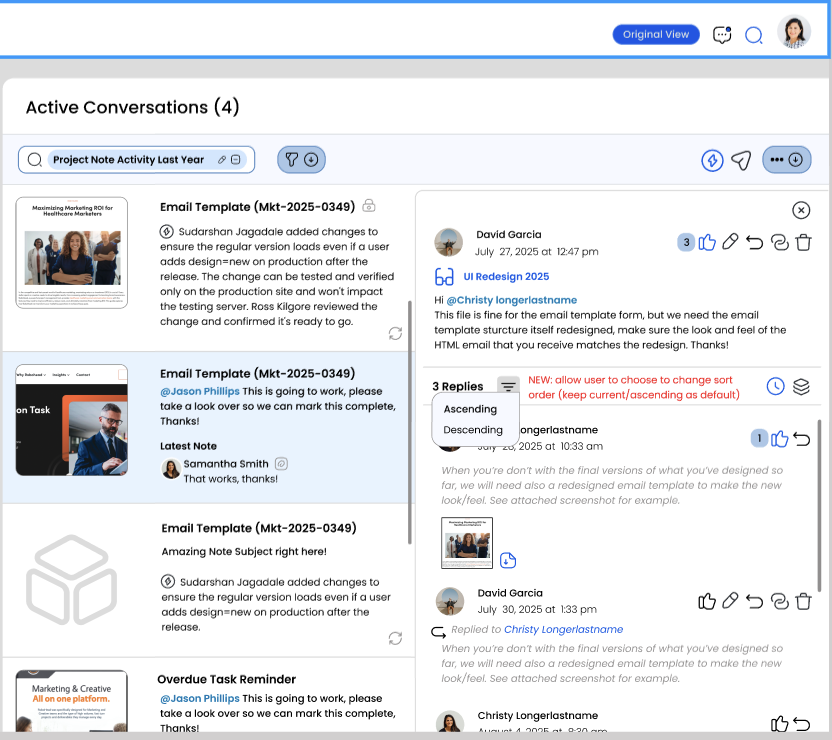
RoboHead Reporting automatically identifies when work is stuck — a review that’s been pending too long, a team member who’s over capacity, or a project that’s drifting past its timeline.
You can intervene immediately. Unblock a stalled review. Redistribute workload. Adjust a timeline. Everything happens faster because you see the problem in real time, not in a weekly status meeting.
- Automatic alerts for at-risk projects
- Bottleneck detection by stage and team
- Recommended actions to resolve blocks
Teams using RoboHead Reporting see measurable improvements in how quickly they respond to project changes and communicate with leadership.
100%
Faster Decision Making
15h
Saved each week
10,000+
Reports/Day
THE CHALLENGE
The insights your team and leadership actually need.
Project Health Dashboard
Project Health Dashboard
Project Health Dashboard
Project Health Dashboard
Project Health Dashboard
Project Health Dashboard
“Before RoboHead, I’d spend 4 hours a week just collecting status from the team. Now I have a single dashboard that tells me if anything is at risk. Leadership gets their answer in seconds instead of days.”
— VP Creative Operations, Large Enterprise
THE CHALLENGE
Reporting is automatic — it grows with your data.
1
Your team creates and completes work in RoboHead
Every project update, status change, and task completion is logged automatically. No manual data entry required.
2
Reporting aggregates that data in real time
Project statuses, team workload, timeline accuracy, and bottlenecks are calculated automatically as work moves through your process.
3
Dashboards and alerts keep leadership informed
Leadership sees one dashboard. You focus on work. Alerts surface problems before they become crises. Everyone stays aligned without meetings.
Let Us Show You
Discover RoboHead’s user-friendly digital asset library that solves the complexity of traditional DAM systems and the limitations of corporate file storage. This demo shows how to effortlessly manage, organize, and share your creative assets with stakeholders.
Ready To Take the Next Step?