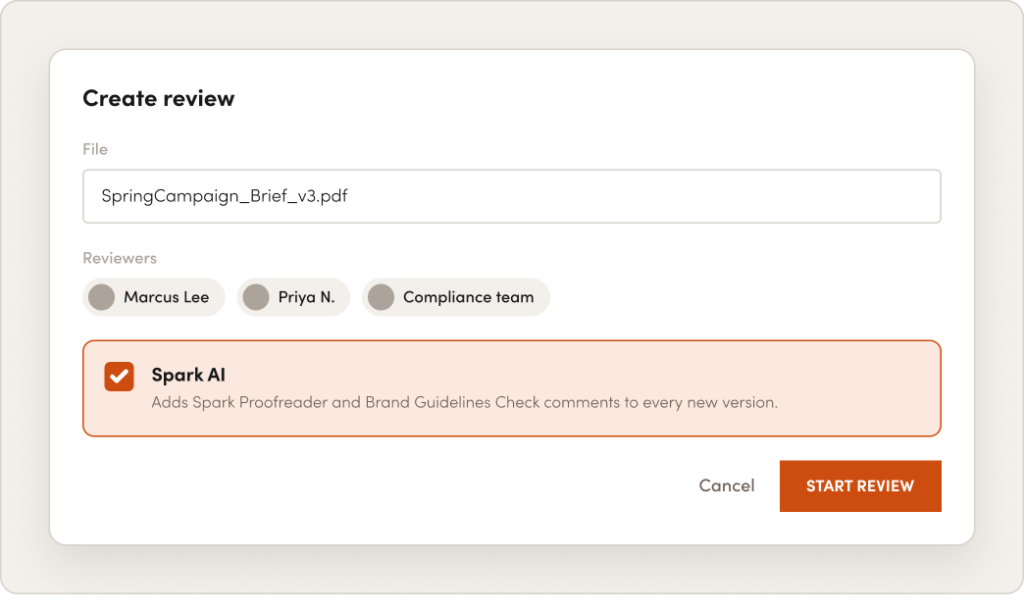
Creative approval software gives creative and marketing teams one place to share work, collect feedback and get sign-off on every version. RoboHead adds Spark AI to that process. Before a deliverable reaches your reviewers, Spark AI checks the copy for spelling and grammar and compares the work against your own brand guidelines. Reviewers see what Spark found as comments on the proof, right next to their own.
Your Reviewers Shouldn’t Be Your Proofreaders
In most review cycles, the first round goes to the basics: a typo in a headline, a logo on the wrong background, a sentence that doesn’t sound like your brand. Each catch sends the file back to design, and a round that should have been about the idea becomes a round about the details.
That time adds up. RoboHead data shows design and branding projects run 11.34% over deadline on average. On a 27-day project, that’s more than three extra days.
Mistakes caught late
Typos and off-brand details surface after stakeholders have already seen the work.
Rounds that fix the basics
Revisions go to corrections a first check could have caught.
Approvers acting as editors
Senior reviewers spend approval time on spelling instead of strategy.
How Spark AI Speeds Up Creative Review and Approval
Spark AI’s review tools are built into RoboHead reviews. Turn them on when you set up a review, and Spark adds its comments to the proof automatically.
Catch Spelling and Grammar Errors With Spark Proofreader
Spark Proofreader reads the text in your documents and PDFs and adds comments wherever it finds a spelling or grammar issue. Each comment is labeled “Spark Proofreader,” so reviewers always know where it came from.
Add brand names and industry terms to your account dictionary, and Spark stops flagging them.
Proofread in 12 languages. Spark detects the language on its own.
Review owners can delete any Spark comment that doesn’t apply.
Check Every Deliverable Against Your Brand With Brand Guidelines Check
Brand Guidelines Check compares each deliverable with the brand guidelines your team has set up in RoboHead and marks anything that doesn’t seem to match, the same way a reviewer would leave a comment. It applies your rules, not a generic checklist.
Run the AI Check Before Anyone Else Sees the Work
Want a clean proof before stakeholders join? Run Spark AI as the only reviewer, fix what it finds and upload the new version. Spark reads every new version again, so each round starts from a cleaner file.
Brand Compliance Software That Uses Your Own Standards
When teams compare brand compliance marketing software, the real question is where the rules come from. Brand Guidelines Check starts from the guidelines you already have. Upload your brand guide as a PDF, add it from a URL or enter the details yourself:
Logos and brand colors
Typography and fonts
Voice and tone
Core values, mission statement and your brand’s do’s and don’ts
Writing style rules, such as AP Style, plain-language standards or readability targets
Spark applies those standards to every deliverable that goes through review. Every proof gets the same brand check, whether it’s reviewed by your brand lead or by a stakeholder seeing your guidelines for the first time.
A Creative Approval Workflow With the AI Check Built In
Spark AI isn’t another proofing tool to log into. It works inside the same RoboHead workflow as the request, the project and the final approval.
1
Request
Work comes in through a RoboHead request form.
2
Project
The project and its reviews are set up from your template.
3
Proof
The file is uploaded for review.
4
Spark AI check
Spark Proofreader and Brand Guidelines Check add their comments.
5
Feedback
Reviewers mark up the proof and focus on the creative.
6
Approval
Sign-off is recorded with a digital signature and a full audit trail.
With Work Roles in your project templates, the right reviewers and review owners are assigned as soon as a project is created. Multi-stage routing moves each version through your approval stages in order or in parallel, and every comment, decision and signature stays in the review history.
Spend your review time on the creative decision. Spark has already flagged the typos and off-brand details, so your comments can focus on whether the work does its job.
Creative Operations
Fewer rounds that exist only to fix the basics. Every deliverable gets the same first check, no matter who’s reviewing it.
Compliance and Legal
A consistent copy and brand check on every version, plus a complete record of comments, approvals and signatures.
Built for Regulated and Brand-Heavy Teams
Healthcare, financial services, consumer goods and education teams work under tighter rules and closer scrutiny. Spark AI adds a consistent first pass to every proof, and RoboHead keeps the record: timestamped digital signatures, version history and an exportable audit trail for every approval.
average time over deadline for packaging projects, down from 11.23% two years earlier
Frequently asked questions
What is creative approval software?
Creative approval software is a tool for sharing creative work, collecting feedback from reviewers and recording sign-off on each version. In RoboHead, creative approval is built into project management, so reviews happen in the same place as the request and the project.
How is creative approval software different from online proofing?
Online proofing is the markup step, where reviewers comment directly on a file. Creative approval covers the whole path to sign-off: who reviews, in what order, which version gets approved and the record of that decision. RoboHead does both, and Spark AI adds a check before reviewers start.
How does AI help with creative review and approval?
AI handles the checks that don’t need human judgment. Spark Proofreader flags spelling and grammar issues, and Brand Guidelines Check marks anything that doesn’t match your brand guidelines. Reviewers start from a cleaner proof and spend their time on feedback that improves the work.
Can AI check designs against our brand guidelines?
Yes. Upload your brand guide as a PDF, add it from a URL or enter it manually, including logos, colors, typography, and voice and tone. Turn on Brand Guidelines Check when you set up a review, and Spark marks anything that doesn’t seem to match.
Does Spark AI replace human reviewers?
No. Spark AI flags possible issues as comments on the proof. Your reviewers decide what to change, and people approve the work. Review owners can delete any Spark comment that doesn’t apply.
Do external reviewers need a RoboHead login?
No. External stakeholders can review and comment in their browser, with no downloads, plugins or login required.
What file types can be reviewed in RoboHead?
RoboHead reviews PDF, JPEG, PNG, GIF, MP4, MOV, HTML and 3D files such as GLB and USDZ in one interface. Spark Proofreader works on files that contain text, such as PDF, DOCX and TXT.
Spark AI also helps your team scope new requests, create visual mock-ups and find answers across your projects.
RoboHead is a project management platform built for creative and marketing teams that gets everyone on the same page and lets you focus on the creative work that drives your growth.